
WhatsApp through GOWA
In short
Section titled “In short”SpeculaPro can send its notifications on WhatsApp as well as by email and SMS. It does this through GOWA (go-whatsapp-web-multidevice), a small server you run yourself, next to SpeculaPro, which holds a WhatsApp session for one phone number, the way WhatsApp Web does in a browser.
- You run GOWA on your private network and link a phone to it once.
- SpeculaPro sends through it: alerts from the
workerrole, and verification codes and test messages from theapirole. - Each person confirms their own number with a code sent on WhatsApp before anything else is sent to it, so nobody can point alerts at someone else’s phone.
- Messages carry case and rule references and a link, never customer data, exactly like email and SMS.
SpeculaPro’s client is built against GOWA v9.6.0 (its API version 9.0.0). It uses two of
GOWA’s endpoints: POST /send/message to send a text and GET /app/status to check the session.
How to set it up
Section titled “How to set it up”1. Run GOWA on your private network
Section titled “1. Run GOWA on your private network”Run the GOWA image, aldinokemal2104/go-whatsapp-web-multidevice, as a service on the same private
network as SpeculaPro: another Compose service, or a Deployment and Service in your cluster.
- Set GOWA’s
APP_BASIC_AUTHto a user name and a long random password. Anyone who can reach GOWA without it can send WhatsApp messages from your number and read its chats, so SpeculaPro refuses to start with a GOWA server that has no user name and password, except in development (SP_ENV=development). - Give it a persistent volume at
/app/storages. That is where the linked session lives; without it, every restart logs the phone out and you must link it again. - Don’t publish its port (
3000) outside the private network. Only SpeculaPro’sapiandworkerprocesses, and the person who links the phone, need to reach it. - Leave GOWA’s
WHATSAPP_ACCOUNT_VALIDATIONon. It is what lets GOWA tell SpeculaPro that a number isn’t on WhatsApp, so a person who types a wrong number is told straight away instead of the message being retried.
2. Link the sending phone
Section titled “2. Link the sending phone”- Open GOWA’s web UI from inside your network and select Login.
- On the sending phone, open WhatsApp → Settings → Linked devices and scan the QR code GOWA shows. GOWA also offers a pairing code instead of a QR code.
GOWA now holds the session. The phone must keep WhatsApp installed and connect to the internet from time to time, as for any linked device.
3. Point SpeculaPro at GOWA
Section titled “3. Point SpeculaPro at GOWA”Set these on every process that runs the api or worker role, then restart them:
SP_NOTIFY_WHATSAPP_PROVIDER=gowaSP_NOTIFY_GOWA_BASE_URL=http://gowa:3000 # include GOWA's APP_BASE_PATH if you set oneSP_NOTIFY_GOWA_USERNAME=speculapro # from APP_BASIC_AUTH; required outside developmentSP_NOTIFY_GOWA_PASSWORD=<from your secret manager>SP_NOTIFY_GOWA_ALLOW_PRIVATE=true # GOWA has a private address: see belowSP_NOTIFY_PUBLIC_URL=https://speculapro.yourbank.com.ghSP_NOTIFY_PUBLIC_URL must be your real address: links in messages point there, and SpeculaPro
refuses to start with the gowa provider if it is empty or localhost. Every setting is in the
configuration reference.
On Kubernetes, set notify.whatsappProvider: gowa and notify.gowa.* in your values, put the
password in your Secret as SP_NOTIFY_GOWA_PASSWORD, and open networkPolicy.egress.gowa. The chart
refuses to render without notify.gowa.username. See
Kubernetes with Helm. In the production
Compose set-up, add GOWA as a service on the same network and set the variables above in your
.env.
4. Check it works
Section titled “4. Check it works”- Sign in as an administrator and open Settings → Notifications.
- Under WhatsApp number, confirm your own number with the code SpeculaPro sends you.
- In the WhatsApp delivery panel (administrators only), check the line reads GOWA: session connected and logged in, then select Send test message to me.
Why “allow private” is normal here
Section titled “Why “allow private” is normal here”SpeculaPro guards every outgoing connection it makes on someone’s behalf (webhooks, SSO, file drops, GOWA) against server-side request forgery: it refuses private, loopback, link-local and cloud metadata addresses, so that a URL typed into the app can’t be used to reach your internal systems.
GOWA, though, almost always is an internal system: a container next to SpeculaPro with a
private address. So the GOWA client refuses it unless you set SP_NOTIFY_GOWA_ALLOW_PRIVATE=true.
That is the normal set-up, and it is safe for this one client because:
- the GOWA address comes only from your own configuration, never from anything a user can type;
- the setting affects the GOWA client only, not webhooks or any other outgoing connection;
- a change of address, provider or device ID is written to the audit log when a
worker starts with it (
notify.whatsapp_provider_changed), so a re-pointed address leaves a trace.
What the setting opens, and what it doesn’t:
| Addresses | With SP_NOTIFY_GOWA_ALLOW_PRIVATE=true |
|---|---|
Private networks (10.0.0.0/8, 172.16.0.0/12, 192.168.0.0/16), IPv6 unique-local (fc00::/7) and loopback (127.0.0.0/8, ::1) |
Allowed |
Link-local (169.254.0.0/16, fe80::/10), cloud metadata (169.254.169.254, AWS’s fd00:ec2::254, Alibaba’s 100.100.100.200, and names such as metadata.google.internal), and 0.0.0.0/8 |
Always refused, including when written as an IPv4-mapped or NAT64 IPv6 address |
Carrier-grade NAT (100.64.0.0/10, used by Tailscale and some VPNs), documentation, benchmarking, multicast and other reserved ranges |
Refused |
The check runs when SpeculaPro starts and again for every connection, after the name is resolved,
so a name that later points somewhere else is still caught. With the setting on, plain http is
also allowed. So protect the configuration itself (who can change environment variables or Helm
values), and use network policies or firewall rules so SpeculaPro can reach only GOWA’s port. On
Kubernetes, narrow networkPolicy.egress.gowa.to to GOWA’s namespace or pods.
If GOWA runs elsewhere and is reached over the internet, leave the setting off: the address must
then use https, and the usual checks apply to every connection.
Whatever the address, SpeculaPro never follows a redirect from GOWA and never uses a proxy for it, since either would hide where the request really goes.
When the WhatsApp session logs out
Section titled “When the WhatsApp session logs out”A linked device can be logged out: from the phone, by WhatsApp, or because GOWA lost its storage.
SpeculaPro treats a missing device the same way: GOWA no longer holds the device named in
SP_NOTIFY_GOWA_DEVICE_ID, or holds several and none was named.
- The worker checks the session every
SP_NOTIFY_GOWA_STATUS_INTERVAL(default 1 minute) and sets the metricspeculapro_notify_whatsapp_session_upto0. The log says notify: WhatsApp session is down: pair or reconnect the device in GOWA; WhatsApp notifications wait in the outbox meanwhile and fail if it stays down longer than SP_NOTIFY_WHATSAPP_MAX_WAIT. - On Kubernetes with the chart’s monitoring on, the alert SpeculaProWhatsAppSessionDown fires after 5 minutes.
- The WhatsApp delivery panel shows GOWA: the WhatsApp session is logged out. Pair the device
again in GOWA; messages wait in the outbox for up to 24 hours, then fail. (with your own
SP_NOTIFY_WHATSAPP_MAX_WAIT). - WhatsApp messages wait in the outbox. They are tried again 30 seconds later, then at growing
intervals up to every 5 minutes, and these tries don’t use up
SP_NOTIFY_MAX_ATTEMPTS. Email and SMS are unaffected. - To fix it, open GOWA’s web UI and log in again by scanning the QR code from the sending phone (or
correct
SP_NOTIFY_GOWA_DEVICE_ID). Waiting messages go out at their next try, within about 5 minutes.
Which errors are retried
Section titled “Which errors are retried”| GOWA answers | What it means | SpeculaPro |
|---|---|---|
400 INVALID_JID |
The number isn’t on WhatsApp, or isn’t a valid number (detected only while GOWA’s WHATSAPP_ACCOUNT_VALIDATION is on) |
Marks the message failed at once: retrying can’t help |
400 VALIDATION_ERROR, 400 INVALID_REQUEST, or another 4xx not listed here |
GOWA refused the request itself | Marks it failed at once |
401 AUTHENTICATION_ERROR |
The WhatsApp session isn’t connected or logged in | Waits for the session, without using up attempts, for up to SP_NOTIFY_WHATSAPP_MAX_WAIT, and marks the session as down |
401 without that code |
GOWA refused SpeculaPro’s user name and password | Retries. The log says GOWA refused the credentials; check SP_NOTIFY_GOWA_USERNAME and SP_NOTIFY_GOWA_PASSWORD |
404 DEVICE_NOT_FOUND, 400 DEVICE_ID_REQUIRED |
SP_NOTIFY_GOWA_DEVICE_ID is wrong, or GOWA holds several devices and none was named |
Waits, as for a logged-out session, and marks the session as down. The log names the setting to check |
429, 408, any 5xx, a timeout, no connection, or an address the network guard refuses |
WhatsApp’s anti-spam limit, GOWA busy or unreachable, or a misconfigured address | Retries |
Retries wait 30 seconds, then 1, 2, 4 and 8 minutes, up to SP_NOTIFY_MAX_ATTEMPTS tries in
all (default 6, so about 15 minutes), then mark the message failed. Waiting for the session is
different: only an operator can fix it, so it doesn’t count against those tries. Error texts written to the log never include phone numbers: SpeculaPro logs GOWA’s error
code, not its message, and strips long digit runs from what it does keep.
Verification codes and test messages
Section titled “Verification codes and test messages”People confirm their own number under Settings → Notifications. SpeculaPro sends these
messages straight away, from the api role, rather than through the outbox, so the person sees at
once whether it worked.
| Message | Limits | Lasts |
|---|---|---|
| Verification code | Per person: one a minute and 5 a day. Per number: 3 a day, whoever asks, in any workspace on the installation. Per workspace: 100 a day | 10 minutes, 5 wrong tries |
| Test message (administrators, to their own verified number) | Per person: one every 30 seconds, 20 a day |
“A day” is the last 24 hours. These limits are built in, not settings. Over a limit, the request is
refused with 429, a Retry-After header and one of these messages:
| Message | Limit |
|---|---|
too many WhatsApp messages; try again in 42s |
The person’s one-a-minute (or 30-second) gap, or their daily count. For the daily count, the time shown is when their oldest send in the last 24 hours drops out (at least a minute) |
this number has had too many codes today; try again in 17h3m12s |
3 codes to that number in 24 hours |
this workspace has sent its WhatsApp codes for today; try again in 2h10m0s |
100 codes from the workspace in 24 hours |
The per-number limit stops anyone, alone or with others in any workspace, from flooding a stranger’s phone with codes. To count codes per number across the installation, SpeculaPro keeps one row per code sent with a keyed fingerprint of the number (an HMAC with the installation’s blind-index key, so it can’t be reversed by trying every phone number) and the time, never the number itself. The worker deletes these rows once they are two days old.
- Only a SHA-256 fingerprint of each code is stored, bound to the person, never the code.
- A number becomes someone’s WhatsApp number only once they type the code back. A database constraint refuses a WhatsApp number that hasn’t been confirmed, so not even an administrator or a script can route alerts to an unconfirmed number.
- Numbers are stored in international (E.164) format. A local number gets
SP_NOTIFY_DEFAULT_COUNTRY_CODE(default233), so0244 123 456becomes+233244123456. These are staff work numbers, not customer data. - If GOWA can’t be reached, the person sees WhatsApp is unavailable right now; try again in a few minutes and the cause goes to the server log only, so the screen never shows your GOWA address.
What administrators see
Section titled “What administrators see”The WhatsApp delivery panel under Settings → Notifications needs settings.manage. It shows
the provider (GOWA, Log or Off), whether the session is connected and logged in, a
Check again button and Send test message to me. It never shows GOWA’s address or
credentials. Until your own WhatsApp number is verified, Send test message to me is unavailable,
with Verify your own WhatsApp number above first.
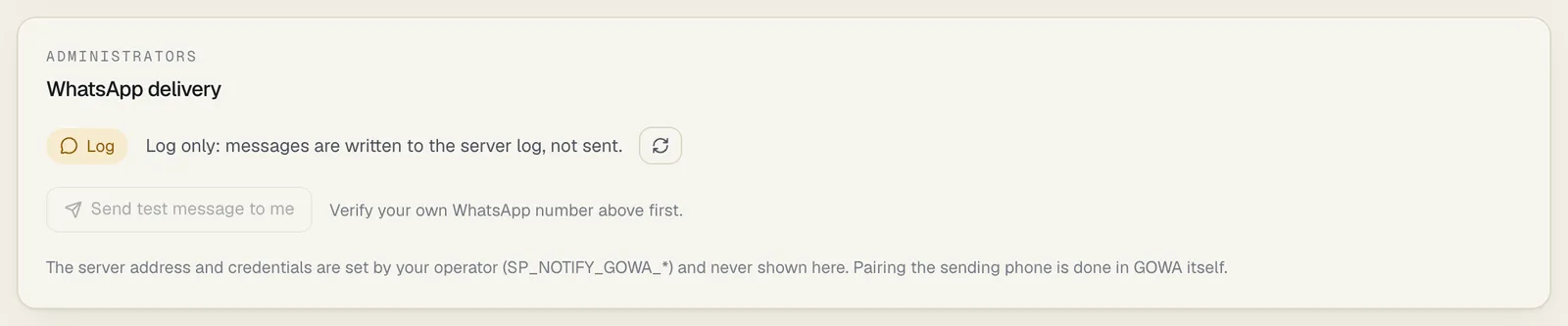
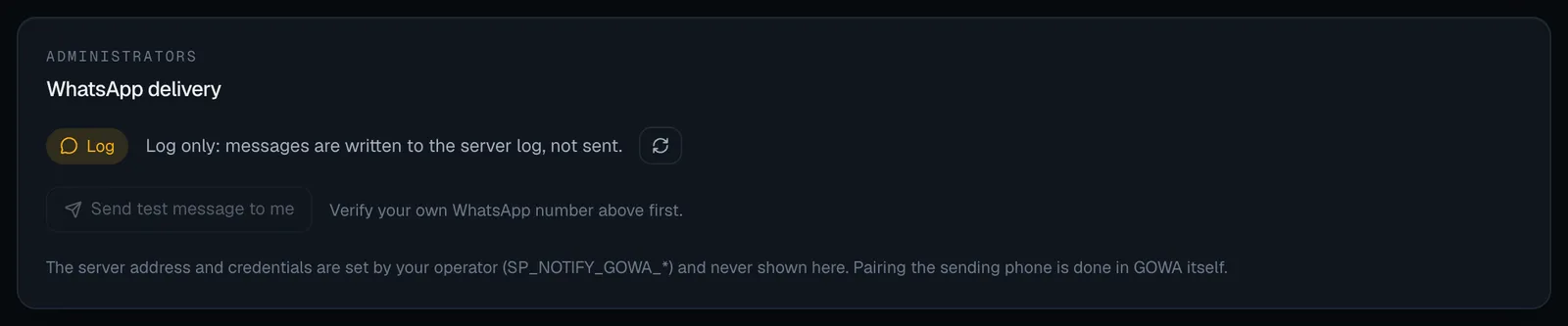
This is the panel on the development stack, which uses the log provider. With GOWA, the badge
reads GOWA and the line gives the session’s state.
The same information is available through the API:
| Endpoint | Does | Needs |
|---|---|---|
GET /api/v1/settings/notifications/whatsapp |
provider (none, log or gowa), and for GOWA connected, logged_in, max_wait_seconds (how long messages wait while the session is down) and, if GOWA couldn’t be asked, a generic error |
settings.manage |
POST /api/v1/settings/notifications/whatsapp/test |
Sends a test message to the caller’s own verified number. 409 if they have none or WhatsApp is off; 429 over the limit; 503 if it couldn’t be sent |
settings.manage |
The log provider is for development
Section titled “The log provider is for development”With SP_NOTIFY_WHATSAPP_PROVIDER=log, nothing is sent: each message is written to the server log
instead. That is what the local demo uses. Even then, the log never shows the whole number (only its
last three digits, such as +*********456) or a one-time code, which appears as [code]. The same
masking applies to the log provider for SMS and email.
To confirm a number on your own machine, set SP_NOTIFY_LOG_SHOW_CODES=true: the log then prints
codes in full. SpeculaPro accepts that setting only with SP_ENV=development; the development stack
sets it for you.
Outside development (any SP_ENV other than development, staging included), SpeculaPro refuses
to start with the log provider for WhatsApp or SMS. Use gowa, or none to turn WhatsApp off.
The log provider for email is still allowed.
If SpeculaPro won’t start
Section titled “If SpeculaPro won’t start”| Message | Fix |
|---|---|
config: SP_NOTIFY_WHATSAPP_PROVIDER must be log, gowa or none |
Check the spelling |
config: SP_NOTIFY_GOWA_BASE_URL must be the GOWA server's URL, e.g. http://gowa:3000 |
Set the address |
config: put GOWA credentials in SP_NOTIFY_GOWA_USERNAME and SP_NOTIFY_GOWA_PASSWORD, not in the URL |
Remove user:pass@ from the address |
config: SP_NOTIFY_GOWA_BASE_URL can't have a query or #fragment |
Remove them |
config: SP_NOTIFY_GOWA_BASE_URL must use https to reach GOWA over a public network; set SP_NOTIFY_GOWA_ALLOW_PRIVATE=true if GOWA runs on your private network |
Use https, or allow private addresses if GOWA is internal |
config: SP_NOTIFY_GOWA_BASE_URL: … set SP_NOTIFY_GOWA_ALLOW_PRIVATE=true if GOWA runs on your private network |
The host is private or internal |
config: set both SP_NOTIFY_GOWA_USERNAME and SP_NOTIFY_GOWA_PASSWORD (GOWA's APP_BASIC_AUTH), or neither |
Set both |
config: set SP_NOTIFY_GOWA_USERNAME and SP_NOTIFY_GOWA_PASSWORD and turn on GOWA's APP_BASIC_AUTH; an unauthenticated GOWA server is allowed only in development |
Turn on APP_BASIC_AUTH in GOWA and set both |
config: SP_NOTIFY_WHATSAPP_PROVIDER and SP_NOTIFY_SMS_PROVIDER can't be log outside development; choose a provider or none |
Use gowa or none for WhatsApp, spalce or none for SMS |
config: SP_NOTIFY_WHATSAPP_MAX_WAIT must be at least 1m |
Use a longer wait, such as 24h |
config: SP_NOTIFY_LOG_SHOW_CODES is for development only |
Remove the setting |
config: SP_NOTIFY_GOWA_TIMEOUT must be positive and SP_NOTIFY_GOWA_STATUS_INTERVAL at least 5s |
Fix the durations |
config: SP_NOTIFY_DEFAULT_COUNTRY_CODE must be a country calling code such as 233 |
Digits only, no + or leading zero |
config: set SP_NOTIFY_PUBLIC_URL to the address people use to open SpeculaPro; links in notifications point there |
Set your real address |
Limits
Section titled “Limits”- Per channel, not per message type. A person turns WhatsApp on or off as a whole, as for email and SMS; they can’t choose WhatsApp for critical alerts only.
- One sending number per installation (one GOWA device, or one
X-Device-Idon a multi-device GOWA server). - Text only: no attachments or buttons. The subject is in bold, and the rest is cut to about 320 characters, then the link.
Related
Section titled “Related”- Notifications: what people see and how they switch WhatsApp on
- Configuration: notifications
- Worker: notifications
- Monitoring
- Kubernetes with Helm