
Retention and legal holds
Ce contenu n’est pas encore disponible dans votre langue.
In short
Section titled “In short”Data protection law says you mustn’t keep personal data longer than you need it. AML law says you must keep identity and transaction records for a minimum number of years. Privacy → Retention & legal holds lets your DPO set, per kind of data, how long it is kept and what happens when that time is up, within the minimums the law sets.
- Each category of data has a retention period in days, counted from a moment that depends on the category (for example the transaction date, or the end of the customer relationship).
- The period can never be shorter than the legal minimum: the longest record-keeping period among the laws that apply to your workspace.
- Nothing is deleted until someone runs a dry run, looks at what it would remove, and switches the purge on.
- A legal hold keeps data whatever its age, for litigation, an inspection or an investigation.
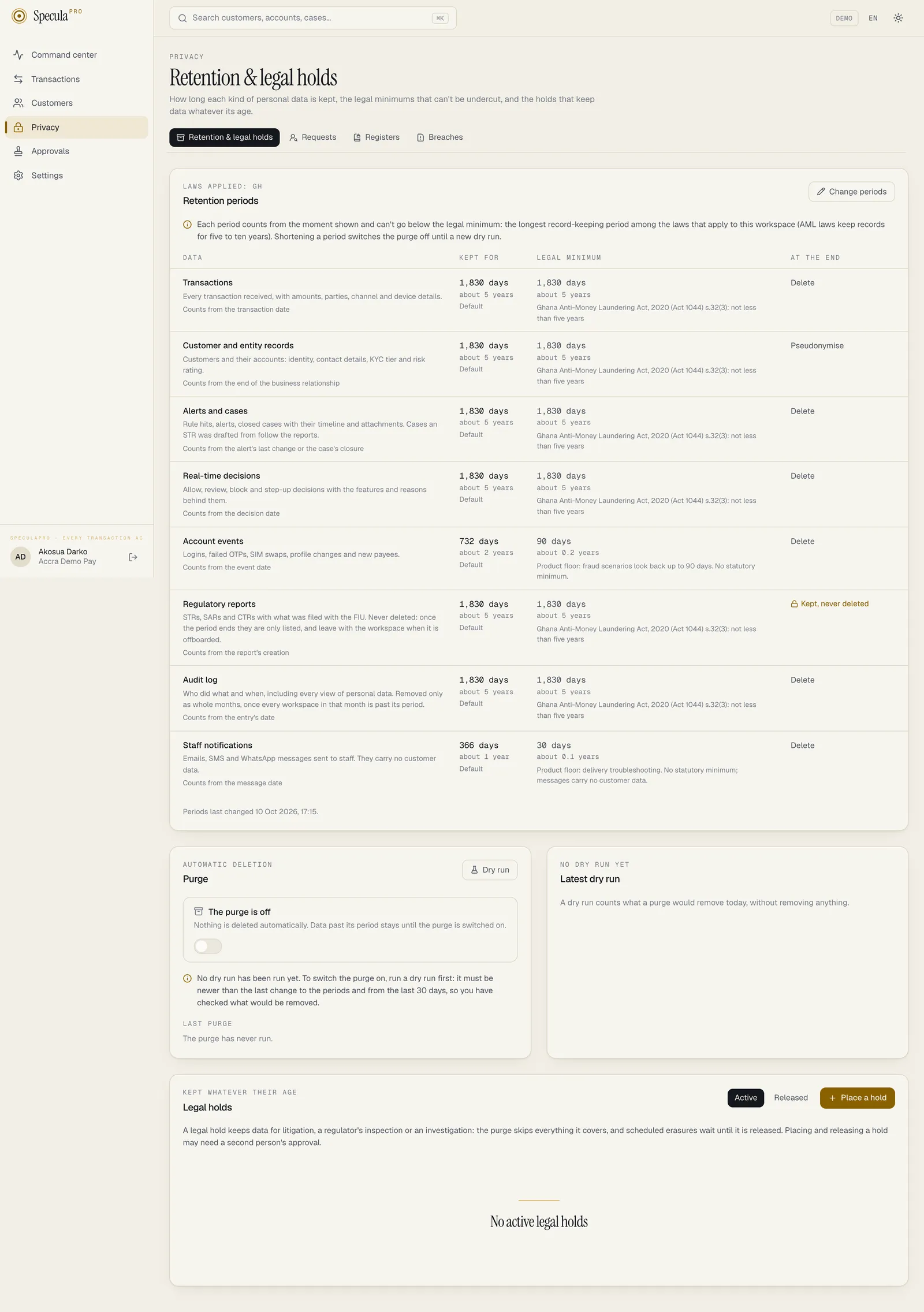
The categories
Section titled “The categories”| Category | What it holds | The period counts from | At the end | Default period |
|---|---|---|---|---|
| Transactions | Every transaction received, with amounts, parties, channel and device details | The transaction date | Delete (default) or pseudonymise | The legal minimum |
| Customer and entity records | Customers and their accounts: identity, contact details, KYC tier, risk rating | The end of the business relationship | Pseudonymise (default) or delete | The legal minimum |
| Alerts and cases | Rule hits, alerts, closed cases with their timeline and evidence files. A closed case kept past the period because a report was drafted from it loses the evidence files that were filed with no report | The alert’s last change, or the case’s closure | Delete | The legal minimum |
| Sanctions and PEP screening | Potential matches against sanctions and PEP lists, how each was decided, and cleared false positives. Open matches are never removed | The match’s closing and the end of the business relationship, whichever is later | Delete (default) or pseudonymise | The legal minimum |
| Real-time decisions | Allow, review, block and step-up decisions, with their features and reasons | The decision date | Delete (default) or pseudonymise | The legal minimum |
| Account events | Sign-ins, failed OTPs, SIM swaps, profile changes, new payees | The event date | Delete (default) or pseudonymise | 732 days (about two years) |
| Regulatory reports | STRs, SARs and CTRs, with what was filed | The report’s creation | Kept, never deleted | The legal minimum |
| Audit log | Who did what and when, including every view of personal data | The entry’s date | Delete, as whole months only | The legal minimum |
| Staff notifications | Emails, SMS and WhatsApp messages sent to staff (no customer data) | The message date | Delete | 366 days (one year) |
Periods are kept in days. A year counts as 366 days, so a five-year minimum is 1,830 days and never ends a day early because of a leap year.
When a customer’s period starts
Section titled “When a customer’s period starts”A customer’s records count from the end of the business relationship: the moment their status
becomes exited. Send that status when an account is closed, through the
customers API or a file. While a customer is active, dormant or
restricted, their records are never past their period. If an exited customer comes back (their
status changes again), the clock is cleared.
Screening records
Section titled “Screening records”Sanctions and PEP screening results are AML records: they are the outcome of customer due diligence. The Sanctions and PEP screening category covers three things:
| Record | What it holds |
|---|---|
| A potential match | The name as screened, the list entry it matched, the scores and the explanation, the provider’s answer for a provider match, the status, who it is assigned to, the decision and its reason, and the match’s timeline of comments and assignments |
| A cleared false positive | Which person was cleared against which list entry, by whom, when, and the reason given |
| Screening state | For each screened customer or counterparty, a fingerprint of what was last screened and the error of a provider that could not be asked. No readable personal data |
The lists themselves are not in the category. A sanctions list is published data, and a workspace’s own imported watch list is about people who are not its customers; neither has a retention period.
When the period starts. A match or a clearance may go only when both of these are older than the period:
- its own closing: the decision, the automatic closing (see why a match was closed), or for a clearance the day it was revoked, otherwise the day it was made; and
- the end of the customer relationship. For a counterparty, who has no relationship, the last time it was seen in a transaction counts.
So while a customer is still a customer, none of their screening records is past its period.
What is never removed, and what is held.
- An open potential match is never purged, whatever its age. An undecided sanctions match is unfinished compliance work.
- A customer with an open match is held, like a customer with an open case: their customer record, and everything else a hold on a customer covers, is not purged or erased while the match is open. In a dry run they are counted under Held. A match whose decision is waiting for a second person is still open.
- A resolved match no longer holds the customer. Once a reviewer clears it as a false positive or confirms it as a true match, the ordinary rules apply again. After a true match they usually still hold the customer: the case it opened holds them while it is active, and the match, the designation and the customer record stay for their AML periods. So clear false positives promptly: see Reviewing a potential match.
- Screening records about a customer under a legal hold, or who is the subject of a report not yet past the reports period, are kept too.
The dry run shows the note Counted from the later of the match’s closing and the end of the customer relationship. Open matches are never removed.
At the end of the period. With Delete, closed matches and clearances past their period are removed. With Pseudonymise, they are kept without the person; see Delete or pseudonymise?. Screening state left behind by a customer or counterparty that no longer exists is deleted in either case.
When a customer is erased or pseudonymised, by the purge or on a data subject request, the screening records about them lose the personal data in the same step, whatever their own period: they are pseudonymised as in the table below, and the customer’s screening state is deleted. The rows themselves then go on this category’s clock. Where the erasure is refused or postponed (AML retention, a hold, an open case or an open match), nothing is touched.
Exports. Screening records are never part of a data subject’s export, for anyone, like alerts and cases. An export can’t reveal that someone matched a sanctions list, or was cleared.
Legal minimums
Section titled “Legal minimums”AML record keeping applies to transactions, customer records, alerts and cases, screening records, decisions, reports and the audit log. Their minimum is the longest period among the laws that apply to the workspace: the main jurisdiction and any others set in Registers → Settings. The strictest law wins.
| Jurisdiction | AML minimum | In days |
|---|---|---|
| Ghana, Nigeria, South Africa, EU, UK, and any country not in the table (FATF baseline) | 5 years | 1,830 |
| Kenya | 7 years | 2,562 |
| Côte d’Ivoire, Sénégal and the other UEMOA countries (Benin, Burkina Faso, Guinea-Bissau, Mali, Niger, Togo) | 10 years | 3,660 |
For example, a Ghanaian workspace that also serves customers in Côte d’Ivoire keeps AML records at least ten years. The page shows, for each category, the minimum and the laws that set it.
Account events and staff notifications aren’t AML records. They have product floors instead of legal minimums: 90 days for account events (fraud rules look back that far) and 30 days for staff notifications.
You can set a longer period than the minimum, up to 36,500 days. A shorter one is refused, with the message … must be kept at least … days (…the law…). The purge also applies the minimum again when it runs, whatever is stored.
How to change a retention period
Section titled “How to change a retention period”You need privacy.manage.
- Open Privacy → Retention & legal holds.
- Under Retention periods, select Change periods.
- For each category, enter the number of days to keep it, and choose what happens at the end (Delete or Pseudonymise, where both are offered).
- Select Save. If your workspace requires approval for retention, the change is sent to a
second person with
privacy.manageinstead. See Approvals.
Delete or pseudonymise?
Section titled “Delete or pseudonymise?”Pseudonymising removes what identifies a person and keeps what is useful for statistics:
| Category | Removed | Kept |
|---|---|---|
| Customers | Name, date of birth, ID numbers and their fingerprints, phone, email, occupation, the raw record and custom attributes. The customer reference becomes pseudonym:<id>, so a returning customer is a new record. Their accounts lose their identifiers and references the same way |
Type, segment, risk rating, KYC tier, countries and dates |
| Transactions | Payment reference, description, IP address, location, device, the raw payload and custom attributes | Amounts, types, channels, countries and dates |
| Decisions | The features behind the decision; the customer reference; the risk model’s reasons; on every rule that fired, live or in shadow, its explanation and feature values; and the free-text note on any feedback reported about the decision | The outcome, score and dates; which rules fired, with each one’s action, severity and score; the risk model’s version, score and percentile; and the feedback’s label, status and fraud type |
| Account events | IP address, location, session, device and custom attributes | Type, channel, result and date |
| Screening: potential matches | The name as screened becomes pseudonym:<id>, the same pseudonym the customer record gets. The fingerprint of the screened data, the provider’s answer, the name parts and factor details of the explanation, and the free-text decision note are removed. On the match’s timeline, each comment and decision reason is replaced with Removed (data protection) |
The list entry and the name on the list that matched, the scores, the factor codes and their effect, the status, the dates, who decided, and who did what on the timeline and when |
| Screening: cleared false positives | The reason given and the fingerprint of the person’s data | Who cleared which list entry, and when |
Deleting removes the rows.
The dry run
Section titled “The dry run”A dry run counts, per category, what a purge would remove today, without removing anything. It records the cut-off dates it used, so you can see exactly which data it looked at.
- On Retention & legal holds, select Dry run. You need
privacy.manage. - Read the result under Latest dry run:
| Column | Meaning |
|---|---|
| Would go | Rows past their period that the purge would delete or pseudonymise |
| Held | Rows past their period but kept by a legal hold, an open case, an open screening match or a report |
| Kept by rule | Rows past their period that are never deleted (reports) |
| Notes | For example A legal hold on the whole workspace: nothing is purged |
Every dry run is recorded, with who ran it, in the run history and the audit log
(privacy.dry_run).
How to switch the purge on
Section titled “How to switch the purge on”The purge is off in every workspace until someone switches it on. You need privacy.manage.
- Run a dry run and review it with your compliance officer.
- Under Purge, switch Automatic purge on.
Switching it on is refused (run a dry run (after the last policy change, within 30 days) and review it before switching the purge on) unless there is a completed dry run that is:
- newer than the last change to the retention periods or the jurisdictions, and
- less than 30 days old.
The page says which condition isn’t met. Switching the purge on or off is under the same approval rule as retention periods.
How the purge works
Section titled “How the purge works”Once switched on, the purge runs in the worker about once a day, every 20
to 26 hours: the worker checks every SP_WORKER_INTERVAL (six hours by default), and starts a new
run for a workspace once its last run is 20 hours old. It doesn’t run at a fixed time of night.
- Old monthly partitions are dropped whole when every row in them may go: every workspace with data in that month has the purge on, deletes (not pseudonymises) that category, is past its period for the whole month, has no workspace hold, and none of its rows there are held or covered by a report. Partitions less than a year old are never dropped. On a shared SaaS database this is rare; it is common on a self-hosted installation with one workspace.
- Everything else is deleted or pseudonymised in batches of 5,000 rows, each in its own transaction. If the worker stops, the next run carries on where it left off, without repeating or skipping anything. A large backlog is worked through over several runs.
- Scheduled erasures from data subject requests are carried out once due. See Data subject requests.
The last purge is shown under Last purge, with how many rows each category lost and which
partitions were dropped. If it says Failed, tell your administrator: on a self-hosted
installation the usual cause is a missing database grant, described under
The retention purge on Helm installations. Every run, and every dropped partition, is in the
audit log (privacy.purge, privacy.partition_drop), recorded as the system.
What is never purged
Section titled “What is never purged”| Kept | Why |
|---|---|
| Regulatory reports | Never deleted. Past their period they are listed in the dry run as kept by rule, and leave only when the workspace is offboarded |
| Transactions and decisions a report covers | They are the evidence behind a filed report |
| Cases a report was drafted from, with their alerts, timeline and the evidence files filed with a report | The same reason. Once the Alerts and cases period has ended, the files on such a case that were filed with no report lose their content: the record stays (name, SHA-256, size, who added it), with the removal reason Retention period ended; not filed with a report. A legal hold on the workspace, the case, the customer or the report stops this. The dry-run counts don’t list these files separately |
| A customer who is the subject of a report, until that report is past the reports period | The report must still identify them |
| Open cases, and everything about their subject | The investigation isn’t finished |
| Open screening matches, and the customer they are about | An undecided potential sanctions match is unfinished compliance work. See Screening records |
| Anything under a legal hold | See below |
| Audit log entries without a workspace (platform-level entries, such as offboarding records) | Kept ten years, the longest AML minimum in the table |
| Audit log months shared with a workspace that keeps them | The audit log is removed only as whole months, once every workspace with entries in that month is past its period |
The analytics store
Section titled “The analytics store”Some installations have an optional analytics store: a second database (ClickHouse) holding a copy of transactions, decisions, rule hits, alerts and cases, used for the Analytics page and long backtests. Whether yours has one is a question for whoever runs your installation; on the Analytics page, the line under the title says Read from the analytics store when it does.
What the copy holds is narrower than the main database: no names, dates of birth, ID numbers, phone numbers, emails, payment references or descriptions. It does hold, per transaction, your customer and account references, the IP address, location, device fingerprint, counterparty fingerprint and any custom attributes you sent, which is still personal data.
Legal holds apply to the copy as well: only what the main database actually removed is removed there, so anything a hold keeps is kept in both places.
What to do, if your installation has the analytics store:
- Record it in your register of processing as a second location of transaction data.
- Ask your administrator how long the analytics store’s own backups are kept: purged data stays in a backup until the backup expires. See Analytics store: how the purge reaches the copy.
This isn’t legal advice.
Risk models
Section titled “Risk models”A workspace can train risk models on its own transactions. Two things follow for data protection.
The stored model holds no personal data. It keeps, for each of its decision trees, which feature each split tests, a threshold and a count; and, for each feature, a handful of summary numbers from the training sample (the smallest, middle and largest value and nine boundaries between them). It holds no transaction, no customer, account or counterparty identifier and no name. A single extreme number, such as the largest amount in the training window, is kept as a number, with nothing saying whose it was. So when a customer is purged, erased or pseudonymised, there is nothing of theirs in a model to remove, and models are not retrained or changed.
Scores follow the record they sit on. While a model is live, its score and reasons for a transaction are saved with the rule hit or the real-time decision about that transaction. They are removed when that hit or decision is deleted, under its own category’s period. They describe the transaction (for example 14 times the customer’s 30-day average), never the customer by name.
Each model’s card states what the stored model contains and never contains: see The model card. This isn’t legal advice: if your regulator treats models trained on personal data in a particular way, confirm with counsel.
AI assistant reviews
Section titled “AI assistant reviews”Each review the AI assistant gives is kept with its alert: the advice, and, encrypted, exactly what was sent to the model and what came back. A review has no retention period of its own. It is deleted with its alert, when the Alerts and cases period removes the alert or the workspace is offboarded, and kept as long as the alert is (for example an alert in a case that a report was drafted from). One thing removes it earlier: an erasure carried out at the customer’s request deletes the reviews of their alerts and leaves the alerts. Usage counts hold no personal data and are kept. On the hosted service the provider keeps its own copy of those counts (calls and tokens by month, feature, model and key, under the workspace’s ID), which stays after the workspace is deleted; it holds no text, no user and no customer.
A draft of a report’s narrative written by the assistant is kept beside its report, encrypted, with the names put back in it. It has no period of its own because it does not outlive the drafting: the drafts of a report are deleted, with what was sent to the model and what came back, when the report leaves draft (sent for approval, or voided). A report that stays a draft keeps its drafts until then; an erasure carried out at the customer’s request, or offboarding the workspace, removes them earlier. The audit log keeps that a draft was asked for, by whom and with which model, never its text.
A case summary is kept with its case in the same way, with the assistant’s suggestion, and deleted with the case or by an erasure at the customer’s request.
The queue of a batch (which alerts or cases a person asked the assistant about at once, who asked, and what became of each) holds IDs and statuses, no text. Finished items are deleted seven days after they finish. An erasure doesn’t remove them earlier; the IDs then point at nothing.
Tuning suggestions for a rule hold no customer data (the rule’s definition and counts) and are kept with the rule until the rule is deleted or the workspace is offboarded. An erasure doesn’t touch them.
A case summary written by the assistant is kept with its case in the same way and has no period of its own: it is deleted with the case (a case a report was drafted from is kept, and its summaries with it), and earlier by an erasure carried out at the customer’s request.
Legal holds
Section titled “Legal holds”A legal hold keeps data whatever its age: for litigation, a regulator’s inspection, or a law enforcement request. The purge skips everything a hold covers, and a scheduled erasure waits until the hold is released.
| What to hold | Covers |
|---|---|
| Whole workspace | Everything: nothing is purged while it holds |
| Customer | The customer, their accounts, transactions, account events and decisions; the alerts, closed cases and rule hits about the customer, about any of their accounts, or about a counterparty that is one of those accounts; and their screening matches and cleared false positives |
| Case | The case, everything about its subject, and, when the subject is a customer or one of a customer’s accounts, everything a hold on that customer covers |
| Report | The report’s case and its subject, in the same way (the report itself is never deleted anyway) |
Alerts, cases and rule hits can be about a customer, an account or a counterparty. A hold on a customer follows all three: it keeps monitoring records about the customer’s accounts, and about counterparties that are those accounts as another customer sees them. The same applies, without any hold, to a customer who is the subject of a case that is still open.
How to place a legal hold
Section titled “How to place a legal hold”You need privacy.manage.
- On Retention & legal holds, under Legal holds, select Place a hold.
- Under What to hold, choose Whole workspace, Case, Customer or Report.
- For a case, customer or report, enter its ID: the ID in the address of its page in
SpeculaPro, such as
1b4e28ba-2fa1-11d2-883f-0016d3cca427. The hold shows the case or report number, or the customer reference, once saved. - Enter the Reason, for example litigation or regulator’s inspection, and optionally a Reference such as the court order or the regulator’s letter.
- Select Save. If the workspace requires approval for legal holds, the hold is sent to a second
person with
privacy.manageand only takes effect once approved.
There can be only one active hold per target: a second one is refused with … is already under a legal hold.
How to release a legal hold
Section titled “How to release a legal hold”- Find the hold under Legal holds (filter by Active).
- Select Release, and say Why is the hold no longer needed?
- Confirm. Released holds stay listed, with who released them, when and why. They can’t be changed afterwards, and can never be deleted.
Once released, the data the hold covered follows its retention period again: data already past its period may be purged at the next run.
What is recorded
Section titled “What is recorded”| Action | Audit log entry |
|---|---|
| Retention periods changed | privacy.retention_update, with each changed category before and after |
| Purge switched on or off | privacy.purge_switch |
| Dry run | privacy.dry_run, with the counts |
| Purge run finished | privacy.purge, recorded as the system, with the counts and any error |
| Partition dropped | privacy.partition_drop, recorded as the system |
| Hold placed or released | privacy.legal_hold_set, privacy.legal_hold_release |