
Evidence files
Ce contenu n’est pas encore disponible dans votre langue.
In short
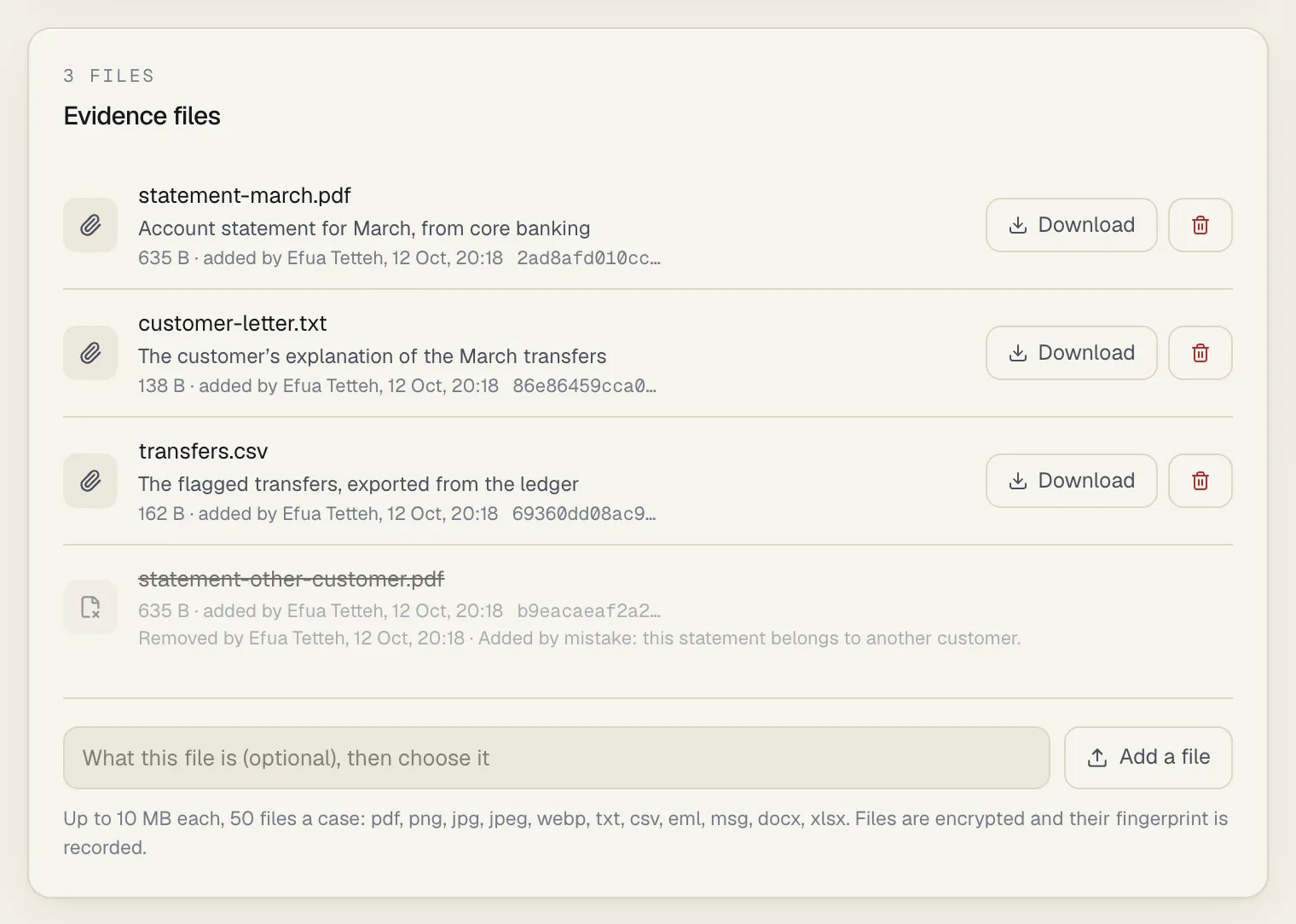
Section titled “In short”An investigation collects documents: an ID document, a bank statement, the customer’s letter, an email. The Evidence files panel on a case keeps them with the case, so the next person who reads it, an approver, an auditor or an examiner, finds them where the decision was made.
- Add a file to any case that isn’t closed: up to 10 MB each, 50 files a case, in eleven common document types.
- Download a file to your computer. SpeculaPro never shows a file inside the app.
- Remove a file you added by mistake, with a reason. Its content is deleted for good; its record stays.
Every file is encrypted, its fingerprint (SHA-256) is recorded when it arrives, and adding, downloading and removing are all recorded.
Who can do what
Section titled “Who can do what”| You want to… | You need |
|---|---|
| See the list of files on a case | cases.view |
| See the files’ real names and notes, and download a file | cases.view and entities.view |
| Add a file | cases.work |
| Remove a file you added | cases.work |
| Remove a file someone else added | cases.work and cases.approve |
With the built-in roles, analysts, senior analysts and the MLRO add and download files, and the MLRO and L2 investigators can remove anyone’s. An auditor can read the list and download, but not add or remove. See Roles and permissions.
What a case accepts
Section titled “What a case accepts”| File types | pdf, png, jpg, jpeg, webp, txt, csv, eml, msg, docx, xlsx |
| Size | Up to 10 MB each. An empty file is refused |
| How many | 50 files a case. Removed files don’t count |
| When | While the case is not closed. A case waiting for a closure approval still takes files |
Anything else (a zip, a doc, an xls, a html page, a video) is refused. Convert it, or save the relevant pages as a PDF.
The content must match the name
Section titled “The content must match the name”SpeculaPro looks at the first bytes of every file and refuses one whose content isn’t what its extension says. A web page renamed statement.pdf is refused, and so is a program renamed photo.png.
The check is honest about what it is:
pdf,png,jpg,jpegandwebpmust begin the way those formats begin.txt,csvandemlmust be plain text.docxandxlsxmust be real Word and Excel documents: a package with its list of content types and its parts in theword/orxl/folder. Another archive renamed.docxor.xlsxis refused. SpeculaPro checks the structure, not what the document says or whether it carries macros or links.msgmust begin with the signature of an Outlook message file.
How to add a file
Section titled “How to add a file”You need cases.work, and the case must not be closed.
- Open the case and find the Evidence files panel, under Alerts.
- Optional, but do it first: in the box What this file is (optional), then choose it, say what the file is, in up to 500 characters. For example Passport, data page, received by email 9 October.
- Select Add a file and choose the file on your computer.
The file is added as soon as you choose it; there is no separate save step. That is why the note comes first: a file added without a note can’t be given one later. It appears in the list with its name, your note, its size, added by you with the time, and the first characters of its fingerprint. Hover over the fingerprint for the whole SHA-256.
The timeline shows added the file passport.pdf.
How to download a file
Section titled “How to download a file”You need cases.view and entities.view. Evidence holds customer identity, so people who don’t see customer names can’t open it.
- In the Evidence files panel, select Download beside the file.
- Your browser saves the file to your computer. Open it from there.
SpeculaPro always sends a file as something to save and never displays it in the app, whatever type it is. Before sending, it decrypts the file and checks it against the fingerprint recorded when it was added. A file that no longer matches is never sent; you see an error instead, which you should report to your administrator.
Every download is recorded in the audit log with your name, the time, the file and its fingerprint. You can download from a closed case too.
How to remove a file
Section titled “How to remove a file”Remove a file added to the wrong case, a duplicate, or one added by mistake. You need cases.work, and either you added the file or you hold cases.approve. The case must not be closed.
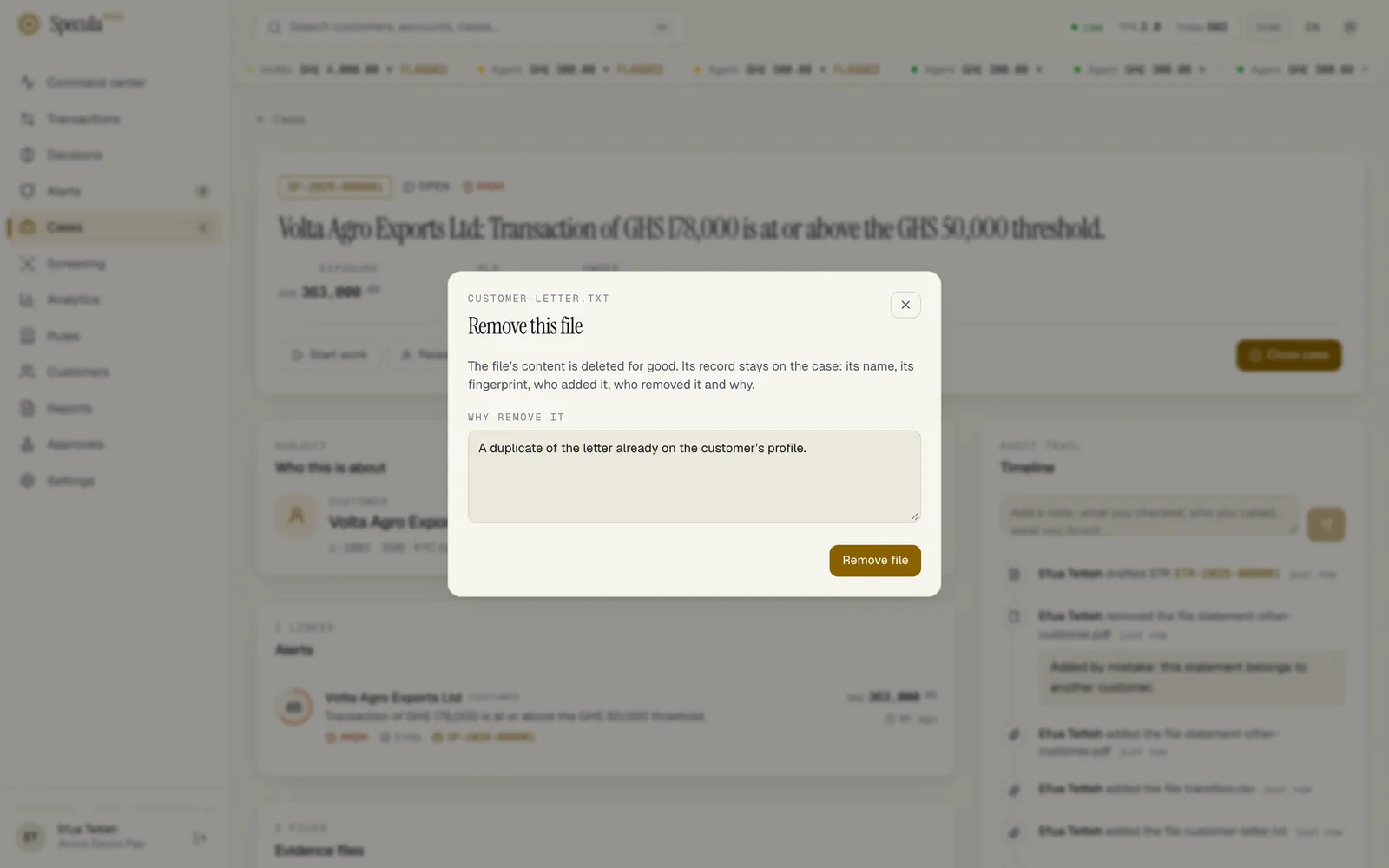
- In the Evidence files panel, select the bin button beside the file (Remove file name).
- Read the warning: The file’s content is deleted for good. Its record stays on the case: its name, its fingerprint, who added it, who removed it and why.
- Under Why remove it, give the reason (for example Wrong customer, a duplicate, added by mistake…), 3 to 500 characters.
- Select Remove file.
The file stays in the list, struck through, with Removed by you, the time and your reason. Its content can’t be brought back. The timeline shows removed the file passport.pdf.
A removal is refused when:
| Message | Why |
|---|---|
| only the person who added a file, or someone who approves closures, can remove it | Someone else added it and you don’t hold cases.approve |
| the file goes with report STR-…, which is no longer a draft | The file was chosen to go with a report that has been sent for approval or further. What was approved is what gets filed, so the file stays |
| the case is closed | Nothing is removed from a closed case |
Removing a file also takes it out of any draft report that named it.
Files and reports
Section titled “Files and reports”When you draft an STR from the case, the draft lists the case’s files, and you tick the ones that go with the report. Once the report leaves draft, the choice is frozen, and those files can no longer be removed from the case. After the report is exported, its filing package is a ZIP of the exported file, the chosen evidence files and a list of their fingerprints.
How files are protected
Section titled “How files are protected”- Encrypted. Each file is encrypted with your workspace’s own key before it is stored, in the database, with the case. A backup of the database is a backup of the evidence.
- Fingerprinted. The file’s SHA-256 is recorded when it arrives and checked every time it is read. If the stored content ever stopped matching, the file would not be served.
- Never shown in the app. Downloads are sent as a file to save, with headers that stop the browser guessing a type or running anything, so an uploaded document can’t act as a page of SpeculaPro.
- Kept with the case. Files stay as long as the case does, and go when the case is purged under your retention settings.
What people who can’t see customers see
Section titled “What people who can’t see customers see”Someone with cases.view but without entities.view sees that the case has files, but not what they say:
- each file is listed as File 1.pdf, File 2.jpg and so on, with its size, date and fingerprint;
- notes and removal reasons are hidden;
- there is no Download button, and the API refuses the download;
- the timeline shows added a file and removed a file, without the name or the reason.
Support sessions
Section titled “Support sessions”Files don’t stay for ever. When a customer is erased under data protection law, the files on their closed cases lose their content and their names. On a closed case kept because of a report, the files that went with no report lose their content once the retention period for alerts and cases has ended. In both, the record of each file stays, with its SHA-256. See Retention and legal holds.
On the hosted service, a member of the provider’s support staff looking inside your workspace under support access can never download an evidence file, whatever the scope of the access, and the notes and removal reasons on files are withheld from them.
What is recorded
Section titled “What is recorded”| What happened | Case timeline | Audit log |
|---|---|---|
| A file is added | added the file … | case.attachment_added, with the file’s name, size and SHA-256 |
| A file is downloaded | Nothing | case.attachment_download, with the file’s name and SHA-256, every time |
| A file is removed | removed the file … | case.attachment_removed, with the file’s name, SHA-256 and the reason |
Timeline entries can’t be edited or deleted, and neither can a removed file’s record.
If something goes wrong
Section titled “If something goes wrong”| You see | What it means | What to do |
|---|---|---|
| That file is larger than 10 MB. | The file is over the limit; it wasn’t sent | Compress it, split it, or save only the pages you need |
| The file is too large. | The server refused the upload for its size | The same |
| … files are not accepted; use one of .pdf .png .jpg .jpeg .webp .txt .csv .eml .docx .xlsx .msg | The extension isn’t one a case takes | Convert the file, for example print it to PDF |
| the content of this file is not what a pdf file holds | The content doesn’t match the extension | Check you chose the right file. If it was renamed, save it properly in the right format |
| the file is empty | The file has no content | Check the file on your computer |
| the file needs a name | The name is only an extension | Rename the file |
| a case holds at most 50 files | The case is full | Remove a file that isn’t needed, or combine documents into one PDF |
| the case is closed; reopen it to add a file | Closed cases take no files | Ask someone with cases.approve to reopen the case |
| evidence files hold customer details; entities.view is needed to open them | Your role can’t see customers | Ask your administrator or MLRO if you should have access |
| There is no Add a file button | You don’t hold cases.work, or the case is closed |
As above |